✦ Startup & founder pricingLaunch prices won’t last forever.Explore the offers ↗
A closer look

A lot more than a play button.

Explore the everyday controls, deeper preferences and optional extras in ZZ Player’s development inventory.
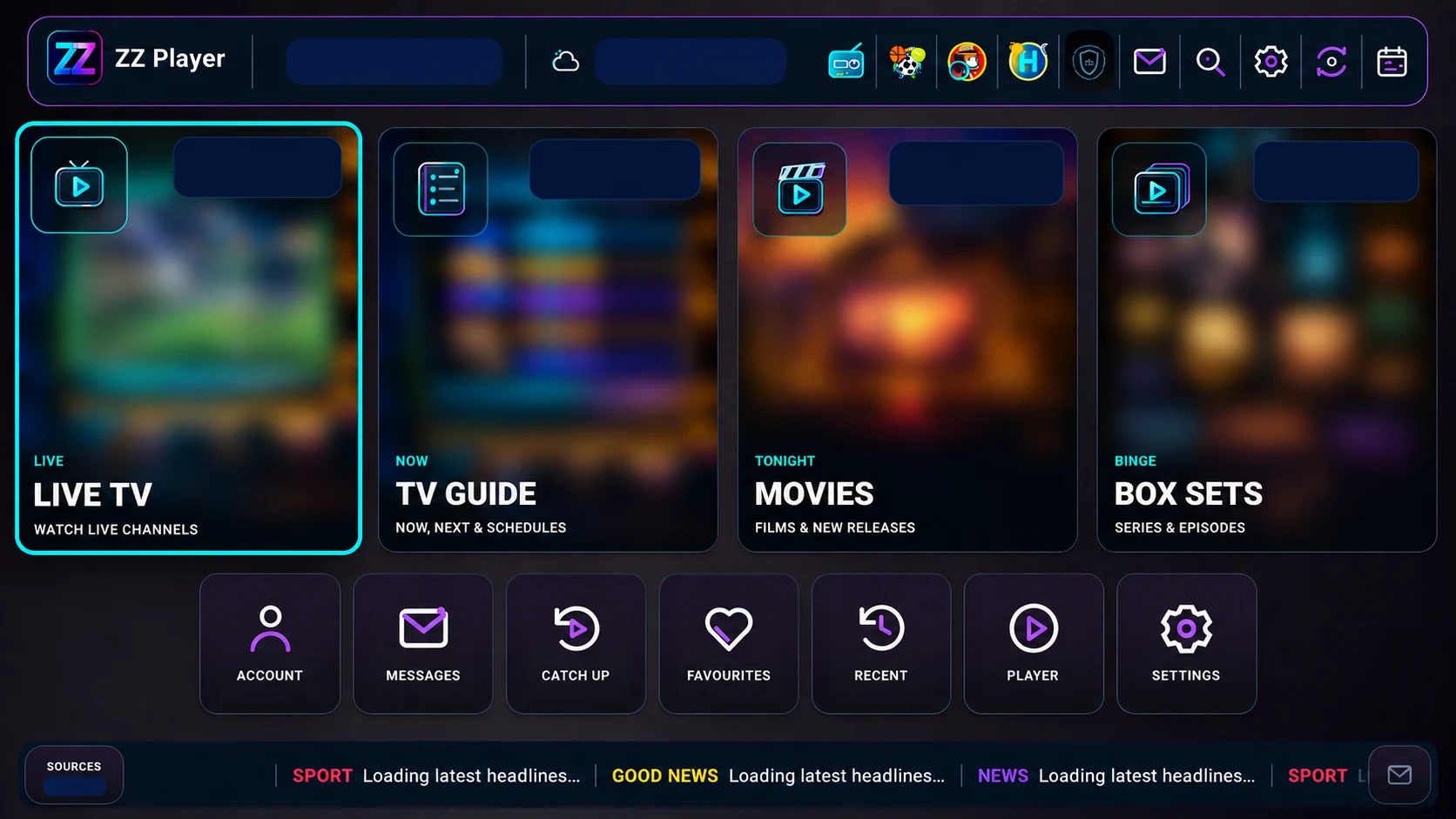
Edited development home screen with private details and catalogue artwork masked
Development capture · privacy, catalogue art and branding edited · final release pending
More control. Less hunting.

Playback comfort, personal organisation and useful extras in one player.

Find your way faster.

Favourites, source-provided groups and catalogue filters help organise your own media.

Find your feature ↗

A little more discovery.

Optional radio, news, local ideas and fixtures add useful context around your screen.

Meet the extras ↗
Find your kind of useful

Big possibilities.
Small everyday comforts.

Browse by interest, or search for the control you need. Open a card to see the development details.

Availability guide: “Development” means present in inspected source, with public release acceptance pending. Optional experiences depend on configuration and third-party service availability. Graphic EQ is newer-source work, not a released ZZ Player feature.

Organisation
Development · release acceptance pending

Login and reseller onboarding

Three supported routes in development source. Enter private connection details only in the app.

Explore 3 development details
  • Provider username/password login
  • User portal connection code
  • Eight-digit Supercode entry
Organisation
Planned service · portal integration pending

Self-service Supercode portal

Generate your own eight-digit numeric access code in a secure user portal, then enter it in the player instead of typing source credentials on the TV.

Explore 6 development details
  • Free Supercodes for portal access
  • Individual-user Supercode generation service: £5 GBP / month
  • Self-service code generation in your authorised portal
  • Eight-minute code activation window
  • Generate a fresh code after expiry
  • This website does not generate or validate codes
Organisation
Development · release acceptance pending

Bouquet organisation

Organise source-provided channel groups, while respecting locked-group protections.

Explore 5 development details
  • Move bouquets up and down
  • Hide a bouquet
  • Rename a bouquet
  • Create a personal bouquet
  • Respect locked bouquet protection
Playback
Development · release acceptance pending

On-screen playback

Adjust the experience without leaving the programme.

Explore 9 development details
  • Current and next programme information
  • Toggle favourite during playback
  • Open subtitle selection during playback
  • Open audio-track selection during playback
  • System mute/unmute
  • Cycle picture mode during playback
  • Persist picture mode by content type
  • Start or cancel sleep timer during playback
  • Playback progress display
Playback
Development · release acceptance pending

Buffering and playback preferences

Balance startup behaviour, stability and personal preferences.

Explore 11 development details
  • Fast Zap / Balanced / Stable buffering modes
  • Selectable start-buffer duration
  • Resume playback preference
  • Separate recovery settings
  • Selectable sleep timer
  • Control fade timeout: 1, 3, 5 or 10 seconds
  • Player selection for Live TV
  • Player selection for movies
  • Player selection for box sets
  • Player selection for catch-up
  • Installed external-player availability and fallback
Playback
Development · release acceptance pending

Multi-screen

Two or three panes where supported by your device and source connection allowance.

Explore 5 development details
  • Enable/disable multi-screen
  • Two-screen side-by-side playback
  • Three-screen layout choices
  • Audio follows selected pane or stays on first channel
  • Provider connection allowance checks
Guide & recording
Development · release acceptance pending

DVR and timeshift

Requires supported streams, permissions and available storage. Local timeshift is HLS-specific; no universal format or series-recording promise.

Explore 7 development details
  • Recording storage quota: 5, 10, 25, 50 GB or automatic
  • Precise scheduled-recording access handling
  • Local rolling 30-minute HLS timeshift
  • Pause / rewind / fast-forward / Go Live
  • Warm-decoder fast channel zapping
  • Bounded same-channel quality recovery
  • Optional startup/stall/recovery monitoring
Accessibility
Development · release acceptance pending

Subtitles

Embedded tracks and optional online sources depend on content and service availability.

Explore 7 development details
  • Enable/disable preferred languages
  • Prioritise a language with hold OK
  • Add subtitle languages
  • Select online subtitle providers
  • Embedded subtitles remain separately available
  • Subtitle text sizes: 75, 90, 100, 110, 125, 150 percent
  • Subtitle appearance and high-contrast controls
Guide & recording
Development · release acceptance pending

Guide and catch-up

Guide data and catch-up archives come from your source. Controls cannot create missing archive content.

Explore 7 development details
  • Provider archive timezone
  • Separate catch-up playback offset
  • Refresh guide
  • Clear and rebuild guide
  • Days shown ahead
  • Guide refresh intervals: 4, 6, 12, 24 hours
  • Guide programme-time adjustment
Accessibility
Development · release acceptance pending

Appearance and accessibility

Options to make navigation and reading more comfortable.

Explore 5 development details
  • Profile theme selection where allowed by CMS
  • High-contrast theme
  • Optional device-startup opening
  • Android text/interface scaling integration
  • Android reduced-motion preference integration
Discovery
Development · release acceptance pending

NewsBeagle

Optional news information, separately configured from your media source.

Explore 5 development details
  • Native news reader
  • 4 / 6 / 12 / 16 story display choices
  • Refresh every 30 seconds / 1 / 2 / 5 minutes or off
  • Cached stories during interruptions
  • Breaking-news ticker
Discovery
Development · release acceptance pending

HappenZing

Optional local discovery and event information. Availability and accuracy depend on upstream services.

Explore 9 development details
  • Live Guide tab
  • Events Now tab
  • Things To Do tab
  • Cinema tab
  • Near Me tab
  • My Night tab
  • For You / Soon / Nearby / Value lenses
  • Local weather display
  • Events ticker
Discovery
Development · release acceptance pending

SportsFixtures

Optional fixture information and matching to channels already in your own catalogue. No sports access rights are supplied.

Explore 6 development details
  • Sports fixtures view
  • Sport and region filtering
  • Live and upcoming ticker
  • Results ticker
  • Sports news ticker
  • Watch routing to matching user catalogue channels
Discovery
Development · release acceptance pending

Weather and location

Optional forecasts with automatic or manual location selection.

Explore 5 development details
  • Automatic location mode
  • Manual selected location
  • Saved location state
  • Cached forecast state
  • Refresh and retry handling
Organisation
Development · release acceptance pending

Filtering and catalogue tools

Find your way through the catalogue supplied by your source.

Explore 4 development details
  • Multi-select filter choices
  • All / selected-values filtering
  • Apply and cancel staged settings
  • Release-year filtering for movie and series catalogues
Discovery
Development · release acceptance pending

Home ticker

Optional information headlines with cached fallback. Not private support messages.

Explore 5 development details
  • Shared home/radio headline ticker
  • Last-known-good cached headlines
  • Category-aware rotation
  • Headline detail overlay
  • Public-ticker classification distinct from private support messages
Organisation
Development · release acceptance pending

Favourites, imports & backup

Source-evidenced local tools; restore coverage and cross-version compatibility still require testing.

Explore 4 development details
  • Favourites and playback progress persistence
  • Local settings/data backup and restore
  • Match supported M3U/M3U8 and XC JSON favourite imports against the current catalogue
  • Not full competitor-backup migration or a cloud-sync guarantee
Discovery
Development · release acceptance pending

Radio & screensaver

Optional radio/discovery and idle-screen experiences, subject to configuration and service availability.

Explore 4 development details
  • Radio interface and radio repository
  • Audio spectrum visualisation
  • Screensaver timing, preferences and preview
  • Cached screensaver policy and assets
Organisation
Development · release acceptance pending

Support & operations

Settings destinations exist; live service integration and public support operations are not yet accepted.

Explore 4 development details
  • Messages, support and suggestions
  • Network health and profile tools
  • Parental controls
  • Privacy and sync settings
Playback
Newer development source · not released in ZZ Player

Graphic EQ

Graphic equaliser controls appear in newer shared source. They are not part of an accepted ZZ Player release.

Explore 3 development details
  • Kept separate from the older preview inventory
  • Radio spectrum visualisation is not an equaliser
  • Release availability still to be established
Your next move

See how it feels.

Bring a compatible local video or audio file and try the working browser preview.

Try the browser preview ↗
ZZ Player · let’s talk

Automated website guidance. Choose a topic below, or select Speak to the team for Sales and Support.

Never share passwords, connection codes or payment details here.